
- Start With the Curriculum, Not the Catalog
- Footprint, Ventilation, and Safety
- Ease of Use Without Sacrificing Industry Relevance
- Material Capabilities and Process Selection
- Software, File Compatibility, and Digital Workflows
- Training, Support, and Long-Term Program Value
- Total Cost of Ownership
- Matching the Machine to the Program Stage
- Working With a Manufacturer Versus a Reseller
- FAQs
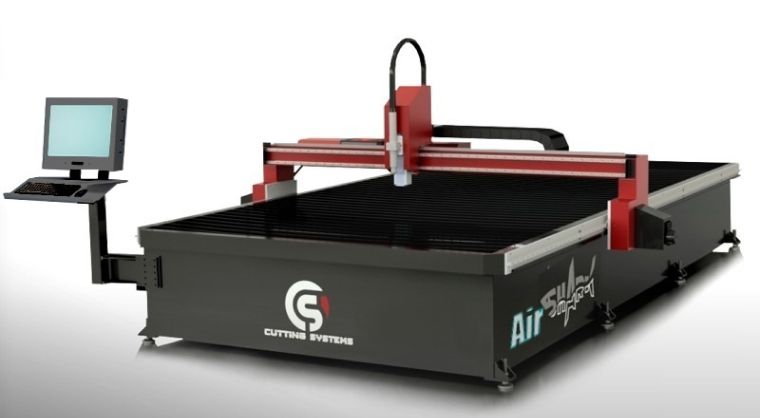
Career and technical education programs face a recurring problem: shrinking shop space, tightening budgets, and a growing expectation that graduates leave with real, transferable manufacturing skills. Choosing a CNC machine for education is one of the highest-leverage decisions a school can make to solve it. The right system anchors a curriculum that moves students from CAD sketches to finished parts using the same workflows they’ll encounter in industry. The wrong system sits idle, eats consumables, or sends instructors hunting for repair parts that no longer exist.
The demand on the other end of the pipeline is real. The Texas Workforce Commission projects more than 11,000 CNC machinist job openings in Texas through 2030 — a figure that includes both new positions and replacement demand as experienced workers retire. Entry-level wages in Texas start around $37,000 to $45,000, with experienced operators earning $56,000 or more at the median and top earners exceeding $80,000, according to U.S. Bureau of Labor Statistics data. Programs that put students on industrial-grade equipment graduate operators ready to fill those roles on day one.
This guide walks through what schools should evaluate when bringing a CNC cutting platform into a classroom or lab, covering physical fit and safety requirements, software, materials, training, and total cost of ownership. The goal is to help educators select equipment that supports both introductory desktop-scale projects and the career-ready training that mirrors actual shop production.
Start With the Curriculum, Not the Catalog
Before comparing spec sheets, the program should be clear on what students need to be able to do by the end of the course sequence. A first-year exploratory class has very different requirements from a two-year welding and fabrication program feeding directly into the local industry. Educational CNC machines should match the depth of instruction, not the other way around.
A few questions to settle first:
- Is the program teaching design and engineering concepts, hands-on fabrication, or both?
- What materials will students work with most often, and at what thicknesses?
- Do graduates need to be familiar with industrial-grade controls and software, or is the focus on fundamentals?
- How many students will run the machine per class period, and how long is each session?
- Are students working toward an industry credential such as NIMS, OSHA 10, or a SkillsUSA competition?
The answers shape every downstream decision. A program focused on prototyping and design thinking can succeed with a compact desktop router. A program training future welders, fabricators, and machinists who will operate plasma tables and oxyfuel systems on the job needs equipment that reflects that reality. Cutting Systems builds custom CNC plasma and oxyfuel cutting machines for all industries, including education, which makes them a relevant option for schools that want students operating the same class of equipment used in production shops.
Footprint, Ventilation, and Safety
Physical space is usually the first hard constraint. A CNC machine for education has to fit the lab, but it also has to fit the lab’s airflow, electrical service, and traffic patterns.
- Footprint and clearance. Cutting tables come in a wide range of sizes. Standard sizes of 4 ft by 8 ft, 5 ft by 10 ft, and 6 ft by 12 ft cover most educational projects and match the sheet sizes students will encounter later. Schools with tight floor plans should measure not just the table footprint but the clearance needed for material loading, scrap removal, and instructor circulation around each student station.
- Ventilation and fume extraction. Plasma and laser cutting produce particulate and fumes that require capture at the source. Downdraft tables with integrated extraction are the standard for school cutting equipment because they pull contaminants away from the operator and into a filtration system. Water tables are another option that controls smoke and slag effectively when cutting mild steel. Downdraft tables are particularly important when cutting aluminum (which releases hydrogen) or stainless (which releases hexavalent chromium), and any school evaluating CNC for schools should plan for filtration as part of the install, not as an afterthought.
- Safety interlocks and guarding. Look for machines with light curtains or barriers, emergency stops within reach of every operator position, and controls that lock out unintended starts. Instructor override and supervisor-level access on the control are valuable for classroom management.
- Electrical and gas service. Plasma systems typically require 3-phase power, though air plasma units up to 85 amps can sever roughly 5/8″ mild steel on single-phase if 3-phase isn’t available. Oxyfuel requires safe storage and delivery of oxygen and fuel gas. Both need to be designed in before the machine arrives.
Ease of Use Without Sacrificing Industry Relevance
The best CNC cutting machines for schools strike a balance: the control needs to be approachable enough for a beginner’s first cut, and capable enough that students see the same kinds of workflows they’ll meet in industry. The Cutting Systems Shark is a clear example of this balance in practice. Its patented CutPro Wizard lets a novice operator start cutting production parts in under five minutes, while the underlying Hypertherm EDGE Connect controller is the same industrial CNC used on the larger Kodiak, Cobra, Raptor, and SaberCut platforms. Students who learn on a Shark are learning the actual interface they’ll see on a production floor.
Practical features that pay off in a classroom:
- Touchscreen controls with guided setup. A clear interface reduces the time students spend troubleshooting menus and increases the time they spend cutting and learning.
- Conversational programming for simple parts. Beginners can produce a rectangle, circle, or bolt pattern without writing G-code, while more advanced students can drop into the underlying code to understand what’s happening.
- Automatic torch height control and consumable tracking. Sensor THC and similar features reduce crashes, extend consumable life, and protect the school’s investment when students are still learning.
- CAD/CAM software students can also access at home or on lab computers. Continuity between the classroom workstation and the cutting table is one of the strongest signals of a program preparing students for real work.
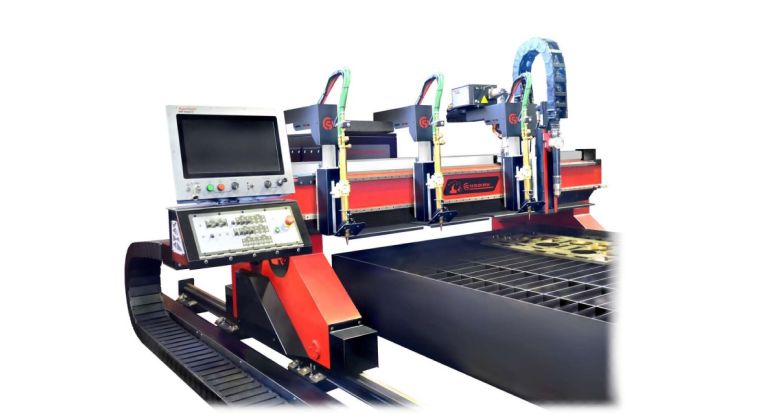
Cutting Systems’ lineup of CNC plasma cutting machines and oxyfuel cutters is built around industrial controls that scale with operator skill, which means the same machine that supports a first-week introductory cut can also support a capstone project on production-grade material.
Material Capabilities and Process Selection
The material a school needs to cut is the single biggest driver of process selection. The three most common technologies in educational settings are:
- Plasma cutting. Versatile, fast, and capable of cutting conductive metals from light gauge sheet up through plate. The Shark, for example, supports plate cutting up to 2″ with plasma and rapid traverse speeds up to 1000 IPM. Plasma is the workhorse for welding and fabrication programs because students cut the same kinds of stock they’ll encounter in industry. Modern systems with fine-cut consumables produce edge quality suitable for finished parts with minimal secondary work.
- Oxyfuel cutting. Best suited for thicker carbon steel, typically half an inch and up. The Shark supports oxyfuel cutting up to 3″ thick, and larger Cutting Systems platforms extend that range considerably. Oxyfuel is slower than plasma but cost-effective on heavy plate and remains a core skill in structural fabrication and shipbuilding programs. A combination plasma/oxyfuel table covers the widest range of educational projects on a single platform.
- Routing and engraving. CNC routers cover wood, plastics, foam, and soft metals like aluminum in lighter thicknesses. These are common in design, woodworking, and entry-level engineering courses where the focus is on toolpaths and form rather than heavy metal fabrication.
For programs feeding into welding, manufacturing, agricultural mechanics, or industrial maintenance, plasma and oxyfuel cover the widest skill set. For pre-engineering and design-focused programs, a router or smaller plasma may be the better starting point.
Software, File Compatibility, and Digital Workflows
CNC cutting doesn’t exist in isolation. Modern programs increasingly link CAD, CAM, nesting software, and the machine control into a single workflow that mirrors how digital manufacturing actually happens in industry.
When evaluating educational CNC machines, look at:
- CAD/CAM compatibility. The machine should accept standard file types (DXF, DWG) and pair with CAM software widely used in industry. Avoid proprietary file formats that lock students into a single vendor’s ecosystem.
- Nesting software. Hypertherm ProNest, integrated on Cutting Systems platforms, teaches students material yield, scrap reduction, and production thinking from the first project. Even at the educational level, nesting is part of a complete training environment.
- Integration with automation and robotics curricula. Programs building toward Industry 4.0 topics, including certifications like FESTO’s Industry 4.0 Associate, benefit from machines that can be observed, monitored, and integrated into broader cell-level workflows. The Yaskawa drive systems with EtherCAT technology used on Cutting Systems machines speak the same protocol students will encounter in industrial automation curricula.
This is where CNC cutting connects to modern STEM pathways. The skills students develop reading and editing toolpaths, interpreting machine feedback, and understanding the relationship between code and physical motion are the same skills that underpin robotics programming and automated production systems. CNC cutting is often a student’s first practical encounter with motion control, coordinate systems, and digital toolpath generation, and those concepts transfer directly to robotics, automation, and additive manufacturing.
Training, Support, and Long-Term Program Value
Equipment is only as valuable as a program’s ability to keep it running. Schools should evaluate not just the machine but the support structure behind it.
Instructor Training
Onboarding should bring at least one instructor up to a confident operator level before students touch the machine. Cutting Systems schedules training on request and offers free unlimited phone and email support for the life of the equipment, which matters when an instructor encounters something new mid-class period and needs a quick answer.
Documentation and Curriculum Support
Some manufacturers provide lesson plans, project libraries, or alignment to industry credentials like NIMS or SkillsUSA competitions. Even if a program builds its own curriculum, vendor-supplied resources accelerate the first year of teaching.
Ongoing Service Access
Cutting Systems provides technical support for installed machines, and that support extends beyond their own product line to other CNC brands, including Koike, ESAB, MG Messer, Hornet, Alltra, C&G, AKS, Machitech, and Torchmate. For consumables and replacement parts, in-stock orders placed by 3 p.m. typically ship the same day, which is the difference between a class running on schedule and a project sitting idle for a week.
Inheriting existing equipment
Many schools acquire an older table from a donating shop or replace a machine that was installed years ago. Rather than scrapping that asset, schools can often retrofit or remanufacture it with modern controls, drives, and a current cutting process. This is a particularly cost-effective path for districts working with capital constraints, and a manufacturer with remanufacturing and retrofit experience can evaluate whether an inherited machine is a candidate.
Total Cost of Ownership
Sticker price is the most visible number, but it isn’t the most important one. A complete view of total cost of ownership includes:
- Consumables. Plasma electrodes, nozzles, and shields, oxyfuel tips, router bits. Annual consumable spend on a school cutting equipment platform can run from a few hundred dollars for a low-use program to several thousand for a busy lab.
- Software licenses. CAD, CAM, and nesting software may carry educational pricing, but verify what’s included with the machine and what’s recurring.
- Maintenance and service. Preventive maintenance kits, replacement parts, and unexpected service calls. Manufacturer-supplied PM kits with components installed at timed intervals can prevent the kinds of failures that take a teaching machine offline for weeks.
- Training refreshers. As instructors turn over, the program needs a way to bring new teachers up to speed.
- Useful life and upgrade path. A machine that can be retrofitted with new controls or a new power source in ten years protects the original investment far longer than one that’s effectively disposable when the manufacturer drops support. American-built machines from manufacturers with decades of service history tend to remain serviceable and upgradeable long after lower-cost imports have aged out.
A machine that costs slightly more up front but holds its value through retrofit and remanufacturing options can be the better choice for a program that plans to teach with it for the next decade or more.
Matching the Machine to the Program Stage
A simple framework for picking a starting point based on program scope:
- Exploratory and introductory programs. A desktop router or compact plasma table introduces students to CAD, CAM, toolpaths, and basic operation without the floor space or service demands of a full industrial table. The goal at this level is exposure and confidence.
- Career-track CTE programs. A unitized industrial table, such as the Shark, available in 4×8, 5×10, and 6×12 standard sizes with water or downdraft configurations, gives students an industrial-grade controller and software stack at a footprint and price point that fits a school lab. Students should be cutting material in the same thickness range and process they’ll see in industry, on equipment that operates the same way.
- Advanced manufacturing and post-secondary programs. Larger custom-configured systems with automation features, multi-process capability, and integration into broader cell-level workflows. At this stage, the cutting platform is one node in a larger digital manufacturing curriculum that includes robotics, additive manufacturing, and quality systems.
Working With a Manufacturer Versus a Reseller
Frequently Asked Questions
Do you offer CNC cutting machines that fit in smaller school labs with limited floor space
Yes. Cutting Systems builds tables in a range of sizes, including the unitized Shark in 4×8, 5×10, and 6×12 standard footprints with water or downdraft table options. These platforms fit most educational floor plans while still cutting the standard sheet sizes students will work with in industry. Beyond the table itself, we help schools plan for the surrounding clearance, ventilation, and electrical service needed for safe classroom operation.
Do you provide training after purchase so instructors and students can operate safely and confidently?
Yes. Training can be scheduled on request, and every Cutting Systems customer receives free unlimited phone and email support for the life of the equipment. We also provide documentation and direct access to our technical team when instructors encounter new situations during class. The goal is for the teacher to be fully confident running the machine before students ever step up to it.
Can Cutting Systems help if our program inherits an older CNC table or a different machine brand?
Yes. Our technical support extends well beyond our own product line to include Koike, ESAB, MG Messer, Hornet, Alltra, C&G, AKS, Machitech, Torchmate, and other CNC cutting brands. We also retrofit and remanufacture older cutting tables, which, depending on the condition of the existing platform, can include new controls, drives, motors, a current plasma or oxyfuel process, and updated software. For schools that have inherited a donated machine or are working within a tight capital budget, a retrofit often delivers a near-new machine at a fraction of the cost of a full replacement.
Related Articles

Perfecting Precision: A Comprehensive Guide to CNC Repair for Optimal Performance
Identifying and Resolving Common CNC Communication Errors Physical Connections Communication errors in CNC systems can occur due to various factors, […]
How To Choose a Plasma Cutter
Choosing a plasma cutter for your machine shop is a critical part of managing your CNC workflow. With new technologies […]
How Does a CNC Machine Work?
CNC machining is one of the most common manufacturing processes in metal fabrication. But how does a CNC machine work […]